About a month ago, I wrote a post about building my own period tracker, and sadly mused towards the end that I was too nervous to take the plunge into self-hosting. “It’s a lot easier said than done,” I quipped, drawing mainly from fancy.
But as of today, I’ve had my home server up and running for about two weeks.
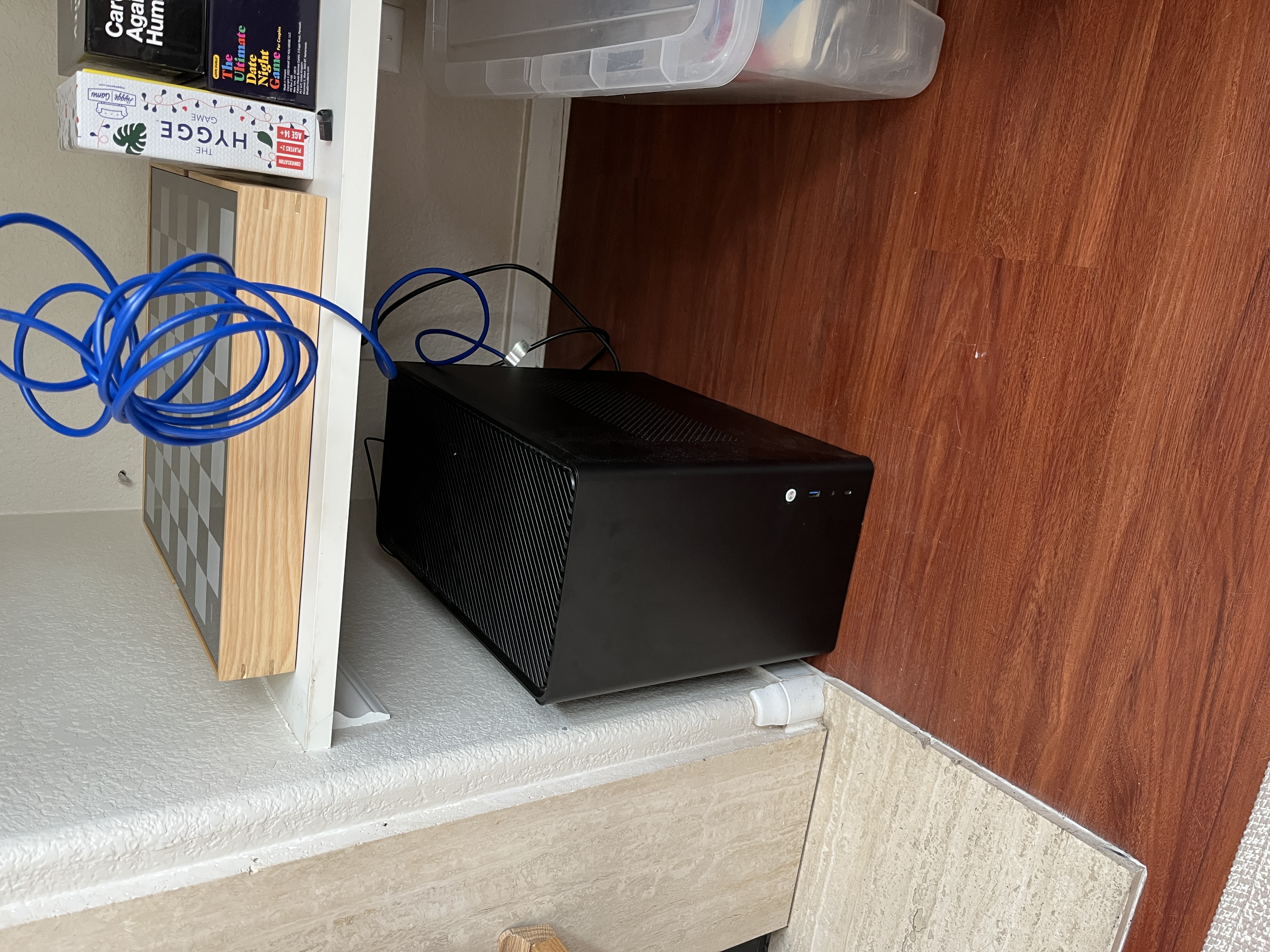
Now I fancy that it’s actually a well-equipped and cute little setup, running:
- A private local LLM chat interface via llama.cpp
- Choice of 3 local models (Qwen 3.5 4B, 9B, or Gemma 2 9B)
- Accessible only by my wife and me
- Self-hosting for apps via Coolify
- Custom sideloaded iOS workout & period trackers with data backup, notifications, & encrypted transport
- Basic frontends for projects like Through Their Eyes
- Network-wide ad and tracker blocking with Pi-hole
- Automatic file syncing for getting ebooks onto my ereader with Syncthing
- Family file sharing & backups with copyparty
Time flew by while setting it up, and I keep finding little use cases for it here and there. I’ve been adding services to it multiple times per week.
I wanted to write this post to share what I enjoyed about the build and what I learned. (If you prefer a technical walkthrough, please refer to this GitHub repo.)
Taking the first step
The wheels were set in motion when I realized I hadn’t turned on my Windows PC in a couple of months. My life had evolved, and I was no longer playing MMORPGs day and night like I was during the pandemic.
What would I lose if I didn’t have a Windows machine?
(Spoiler alert: nothing.)
I dusted it off and booted it up for the last time (with a Windows OS anyway), dragging the few remaining important folders into my Google Drive. I’d accumulated a lot of old work documents. It reminded me of cleaning out my backpack at the end of the school year, weighing whether or not to keep my binder from Mrs. Bowers’ 10th grade psychology class just in case.
I’ll refrain from complaining about the upload speed of free software, but after an hour, the D drive was backed up and work could begin.
Dollars and sense
Aside from having the PC already, setting up my home server hardly cost anything:
- $13.99 for an ethernet cable
- $20 to rent the domain
zaro.hostfor a year (a purely cosmetic indulgence)
I used a few materials that I already had:
- The aforementioned PC (it cost $1145 in 2020, but is by no means a “high end” machine)
- A USB drive
Time spent on the first-time setup:
- About 6-8 hours actively working (running shell commands, chatting with Claude, ducking into the hardware store, etc.)
- About 24 hours in total from when I first booted up my PC (I waited overnight for DNS propagation)
I’ve spent more hours since then tinkering, adding more services, installing command line tools, little things here and there. It’s a bit addictive. I’m constantly discovering new things my server is capable of.
You frankly don’t need fancy hardware
I had this perception (and you may also) that homelabbing is for people who already know networking or computer engineering and have $5000 and a spare server rack lying around. Both r/homelab and r/selfhosted are a stream of giant multi-computer setups and diagrams of the 7 VLANs some guy’s got set up for his home camera system. Just remember that the immutable laws of social media dictate that the most over-the-top builds get the most attention, leaving the much more real, but much more humble builds at the bottom of the digital pile.
As unglamorous as an old pre-built PC might be, it runs all the services I need right now. It has 1TB of storage for hosting different projects, language models, and file backups, and perfectly fine networking capabilities.
There are two areas where I can see potentially upgrading in the future:
- A separate computer for backups. Eventually I do want to stop paying for iCloud+, but I won’t feel comfortable completely migrating off of it unless I have proper redundancy and an online backup service.
- A better GPU. My graphics card has 6GB of VRAM, and without getting into the weeds too much, that’s pretty small when it comes to running large language models. But graphics cards are pretty expensive right now due to the GPU wars, and an upgrade could also require a new power supply. (More on how I worked around this below.)
Claude
I feel like I’m giving an Oscar acceptance speech with this next line, but I really couldn’t have done it without Claude.
When I was first considering this project, I opened up a chat just to rant about my concerns - that I worried about server downtime, especially if I was traveling, and that I didn’t want to spend hundreds on new hardware. Claude answered matter-of-factly that you can add new hardware later, and that wake-on-LAN and restore on AC power loss settings cover most downtime issues.
Its nonchalance was perversely empowering. My biggest concerns were met with casual dismissal. I had worked homelabbing up to be this big nerd hobby in my head when it was actually an attainable reality. I asked Claude to write up a full step by step guide, from installing Ubuntu server to deploying a project.
Claude made a lot of mistakes over the course of 8 hours (the first one being to estimate the entire process would take just one), but they were small and recoverable. It more than made up for them.
For example, I got completely stuck early on because the Ubuntu server installer couldn’t connect to my monitor properly. The display was blank. That meant I couldn’t see the generated password for the installer user. Eventually, I found an obscure forum post with a complicated fix, and Claude executed that fix in just a few minutes.
I’d say this build would’ve easily taken a week (or possibly not even happened) without Claude.
Getting comfy with Linux
I’ve been spending more time in the command line lately since the advent of Claude Code. It’s not a technology I ever learned formally, and so I’ve generally felt uncomfortable in it, preferring a GUI.
But when your computer has no monitor, you start to see it differently. I finally learned how ssh works and when sudo is needed, and I can confirm that the Linux file system names (bin, mnt, etc, etc.) make no sense. I learned recently that old school computers booted straight into a command line, so in a sense it feels quite wholesome, like washing your clothes with a washboard instead of chucking them into the machine.
I’ve never felt like such a hacker as using ssh -L with port forwarding to view the Pi-hole admin dashboard from my Mac.
By the way, our Pi-hole has blocked over 2500 queries to ad & tracking domains in the past 24 hours. Can you guess the top one?
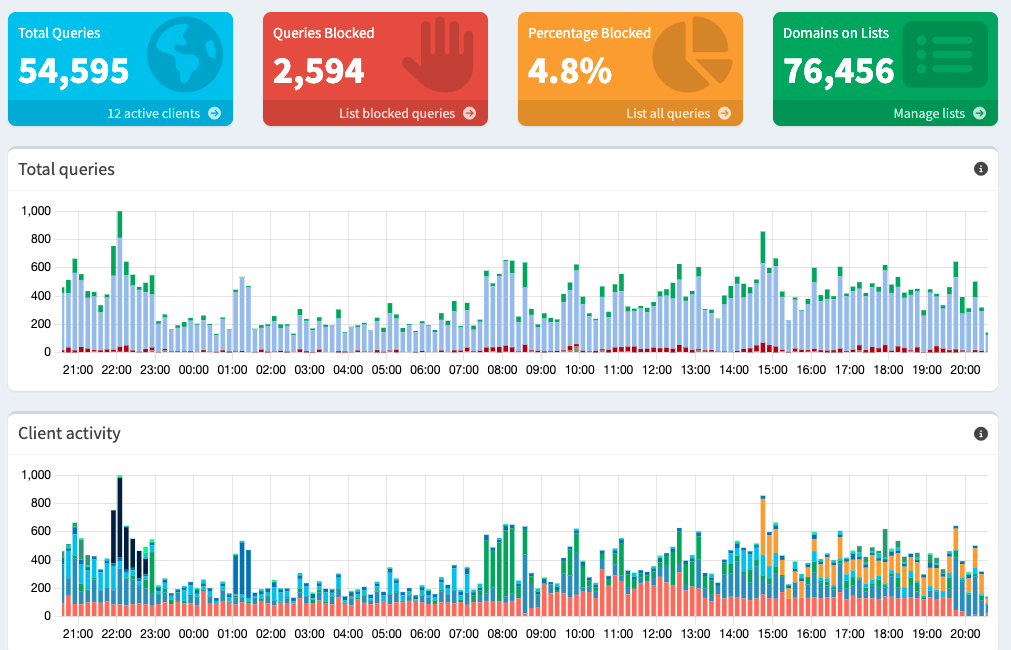
None other than logs.netflix.com. They really want to know what you’re watching!
The local LLM
First of all, “large” language model is a misnomer. These things are MASSIVE. Gargantuan. Titan. Planet-sized.
It has been very humbling to realize what fits on what I would consider a good home computer. I originally bought this computer for gaming. I was never a very “serious” gamer, but this computer truly handled anything I threw at it. I was sure it could run an excellent quality model with a high throughput.
But then came reality.
For whatever reason, I ended up picking Gemma 2 9B 4-bit quantized as my first model. It ran at a pitiful 10 tokens/second (about 7.5 words/second). Despite multiple sources claiming it “punched above its weight class” in intelligence, responses were often circular, sometimes nonsensical. I also had to set parallel requests to 1 and context window to the thumbtack-sized 2048 tokens. Even so, some of the layers needed to be offloaded to the CPU.
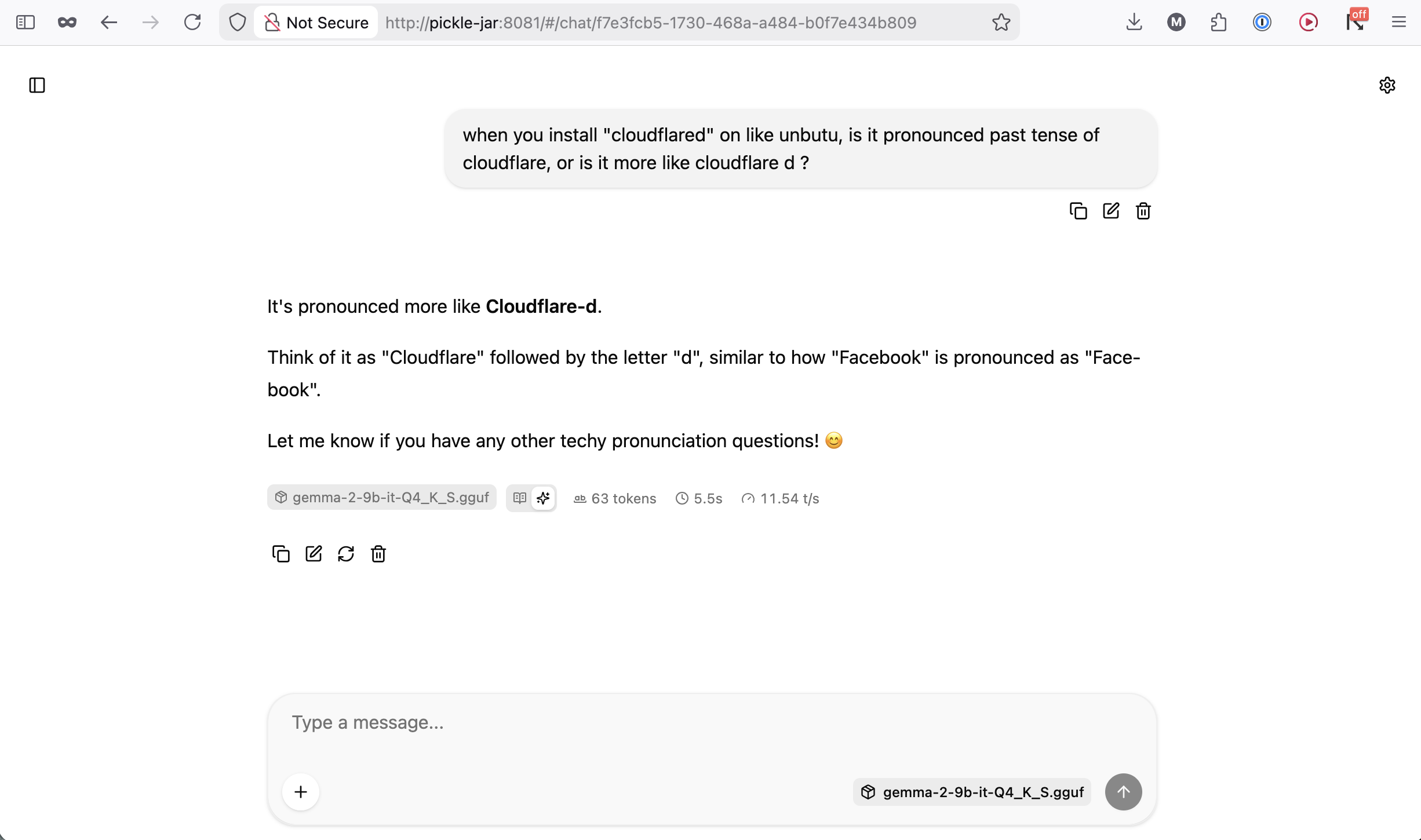
This is like, a tiny model with like, a tiny context window, and it still doesn’t fit on a GPU that runs Elden Ring handily.
Meanwhile GPT-4 was rumored to have 1.8 trillion parameters.
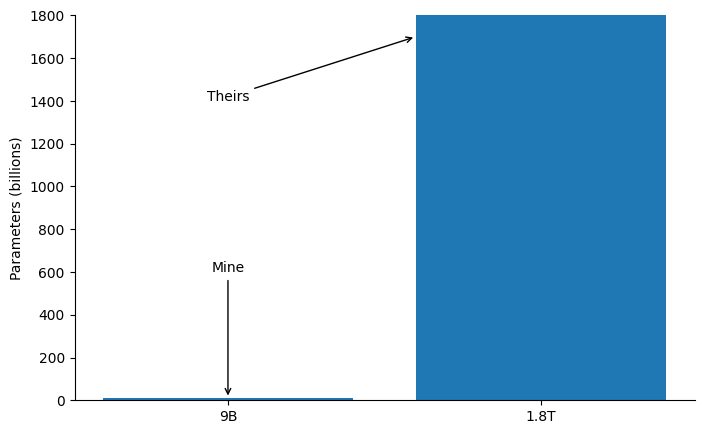
I almost hate to say it, but thinking about the hardware Anthropic must dedicate to JUST ONE instance of Claude Code makes me feel like $100/month for the Max plan is a complete steal. I pay around $10/month in electricity just for my comparatively puny hardware to idle.
I’m no longer taking my Claude usage for granted.
Self hosting
The original goal of all this was to keep my reproductive health data truly private - by hosting it on my own server.
That privacy is now a reality.
My custom iOS period tracker Moonthread stores all data on my home server, with encrypted transport through a mesh VPN.
It’s been an incredible feeling to get this information off of someone else’s server and onto my own. It’s made me realize how truly difficult it is to take control of your data. A few weeks ago we picked up a “sensitive stomach” dog food at the grocery store; later that night, I opened up Amazon only to find a different brand of “sensitive stomach” dog food in my recommendations. It has become easier to conceal data on a smartphone app than it is to hide data about the dog food you buy, a decidedly analog product.
Since setting up the server, I’ve given all our household utilities subdomains on zaro.host, making it easy for my wife to access them too:
chat.zaro.hostfor our private LLMdrive.zaro.hostfor file backups- And so on
(These services are all protected by Cloudflare auth. You can try logging in if you like, but you won’t be able to!)
We use copyparty multiple times a week now to share documents with each other and back up files to the server. It’s also at least 10 times faster than uploading to Google Drive.
And the local LLM has been a great (and sometimes funny) companion for private questions about nutrition and workouts - whatever we don’t feel like telling a multi billion-dollar corporation about.
Should you try homelabbing?
I’ll be honest, most people I share this project with are completely nonplussed. I think that feeling comes largely from two sources.
First, it’s intimidating. I don’t think I’m the only one walking around with the unconscious baggage that “only networking engineers with extra dough do this”.
And second, having a home server is a trade-off, not a strict upgrade. I can store 50,000 photos in my iCloud account for $3.99/month worry free. Or, I can set up multiple redundancy systems, install much uglier open source software, and still pay more than $3.99/month in electricity to host all those photos myself.
I think having a home server is a good idea if it aligns with your values. (Do these sound like you?)
- Privacy. With a home server and a mesh VPN, storing and accessing your data is as private as you can get. Period data, LLM therapy chats, your weight log - those can all stay just with you. You don’t even need to expose that data to the wider internet if you want - you can just keep it on your home network.
- Independence. Price increases, product shutdowns, feature deprecations, enshittification. Sites and apps we use every day change every day, and not usually for the better. While software and the internet will always evolve, you have much more control over the products you use when you self host. Since I’m in charge, I decide when to introduce new features or remove services, and I certainly won’t be raising prices on myself.
- Personalization. Most software is designed to be as simple to use as possible, but that also means it trends towards one-size-fits-all, with few opportunities for customizing. With self-hosting, you can build exactly the product that you need. I set up only the services I want, and host the apps I need as I build them. My workout tracker has exactly what I use every day and no more. And I only pay for the features of my home server I actually use.
- Learning. I learn by doing, and I learned a lot by setting up this home server. I’ve had “unix sysadmin” on my to-learn list for awhile, but only in the past few weeks have I understood more about users, permissions, the file system, and basic unix commands beyond
mkdirandcd. I’ve learned a ton about networking security using Cloudflare and Tailscale because I’ve needed to implement a tiered model for my apps to talk with the server. So learning is baked in.
Because these values are relatively common, I think technology will trend towards self-hosting. Aside from higher hardware prices, self-hosting is more accessible than ever. At this moment in time, we have so many advantages:
- Claude (or ChatGPT) to guide you through every step of the way
- Generous free tiers from Tailscale and Cloudflare to help you keep your network secure
- Extremely high quality free and open source software for almost every purpose under the sun, replacing programs from Netflix to Google Drive to Ring cameras and more
My wife has been thrilled with the local LLM, copyparty, and custom workout tracker. And I really only care about two opinions: mine and hers. Knowing that I’ve made her life easier, more fun, and more private is incredibly satisfying.
At the end of the day, to me, that’s what homelabbing is about. Making life better for myself and my family. If that resonates with you, I’d encourage you to give it a try. I think you’ll succeed.